

You can log in to your website directly through WordPress Manager via cPanel or DirectAdmin, which bypasses the WordPress credentials.
Click here for cPanel instructions.
Click here for DirectAdmin instructions.
Follow these steps to log in to WordPress using WordPress Manager in cPanel:
1. Log in to your cPanel account.
For instructions on how to log in to your cPanel account, please click here.
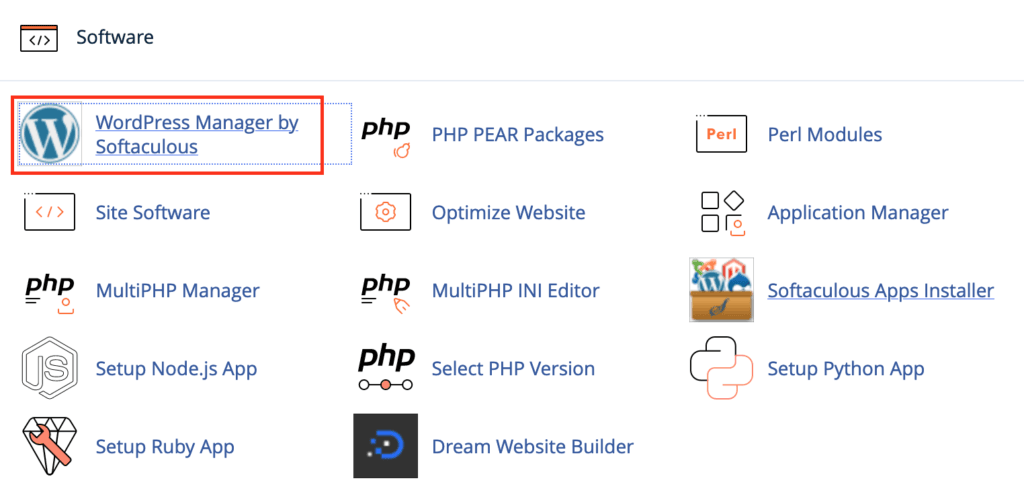
2. Under the Software section, click WordPress Manager by Softaculous.
3. You can see your list of WordPress installations under the Installations section. Click the Login button for the site you want to log in to.
Note: If you cannot see your WordPress site, you can scan for WordPress Installations. For more information on scanning for WordPress Installations, please click here.

Follow these steps to log in to WordPress using WordPress Manager in DirectAdmin:
1. Log in to your DirectAdmin account.
For instructions on how to log in to your DirectAdmin account, please click here.
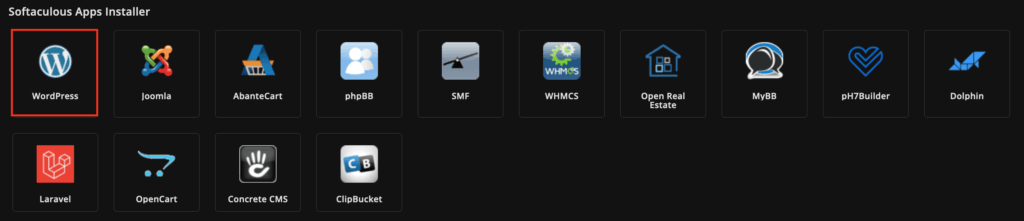
2. Under Softaculous Apps Installer, click WordPress.
3. In the top right-hand corner, click the WordPress icon to open WordPress Manager.

4. You can see your list of WordPress installations under the Installations section. Click the Login button for the site you want to log in to.
Note: If you cannot see your WordPress site, you can scan for WordPress Installations. For more information on scanning for WordPress Installations, please click here.
