

Follow these steps to obtain your domain's EPP code from your MyDreamIT account:
1. Log in to your MyDreamIT Portal by clicking the MYDREAMIT button on the top right-hand side of our website. Alternatively, you can log in via this link here.

2. Enter your login information to access your MyDreamIT Portal. (These are the details you used to sign up with us when creating your account.)
3. Once logged in, click the Domains tab, then click List Domains.
4. Click on the drop-down menu (3 dots) associated with the domain you wish to get the EPP code for, then click Manage Domain.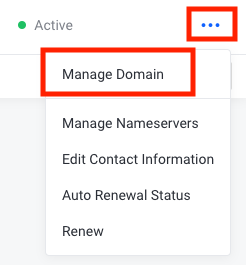
5. On the left-hand side panel, click Get EPP Code, and the EPP code will appear on the next page.